Proxmox Homelab: Initial Setup
Table of Contents
For as long as I can remember, I’ve always been a bit of a hacker…
In primary school, I downloaded my first PC games in torrent and later did the same for my NDS games.
In middle school, I changed from Windows XP to Ubuntu 12.04 and did my teeth on the wildly magical world of Linux.
In High School, I got my hand on a Raspberry Pi 2B and OF COURSE tried to do MY OWN Retrogame Center with Retropie, Batocera and Recalbox. I also wanted to watch my anime series and TV shows on my monitor and installed some - hmmm… - shady streaming plugins on my Kodi/LibreElec mediacenter.
It was good time. But I wanted more…. MOOOOORE !!!
So, the idea of downloading my own Movies and TV shows automatically without having to take countless hours to search for legit magnet links IN FRENCH (yes, yes I was not bilingual at the time) was an idea that forever took some place in my head.
That’s why, 5 years after my baccalauréat and just after finishing my end-of-term internship, I took some time to think of an architecture that would really let me achieve my dream : the ULTIMATE NAS.
My objectives were trifold:
- deploy a server for automatic acquisition of movie/tv-show under different quality
- with the ability of watching them remotely
- under maximum security conditions.
Without saying, being a NAS, it should also have the potential of storing all my files and backups. All steps of my reasoning were conducted with these objectives in mind.
And it all started with the choice of equipment.
The Hardware#
I desired a high storage capacity, high-performance, low-energy footprint and - in priority - low-investment reduced-size SBC.
On the Internet, all were talking about Zimaboard, Intel NUC, rack-mount setup and what not. But I found something even more interesting : the FriendlyElec CM3588 NAS.
This board was brought up by Linus Tech Tips in its Paying for Cloud Storage is Stupid - YouTube video, and it was a really nice find coming from him.
The big upside of this little boy is its 4x M.2 PCIe 3.0 NVMe slots, each of them accepting up to 4TB storage. This means 16TB NAS for for 145 bucks only ! HUGE !
The price of this beast is also a godsent, as I could totally imagine running a little cluster with 3 of these monsters in the following years.
The relatively new Rockchip RK3588 CPU with 8GB RAM should support the majority of the software stack through the ages with minimum energy expenditure, being an ARM64-based architecture. And its GPU/VPU supports up to 8k60fps H.265 out, meaning no issue with high-quality movie formats.
Its modularity is also a much appreciated spec here: If I ever need to upgrade for bigger performance (let’s say for gaming, who knows…), I only need to buy a new module and not all the carrier board.
The manufacturer give access to 6 OS on this board:
- a customed OpenWRT,
- OpenMediaVault,
- Ubuntu,
- Debian,
- AndroidTV,
- Proxmox VE
I was very curious about Promox VE since viewing some of the Novaspirit Tech videos (god bless his soul), and wanted to try the containerized approach.
All documentation can be found here and here for the installation. Personnaly, I choosed to do it via USB.
The Architecture#
After much deliberation and countless late-night planning sessions (fueled by way too much coffee ☕), here’s what I’ve crafted for my homelab architecture:
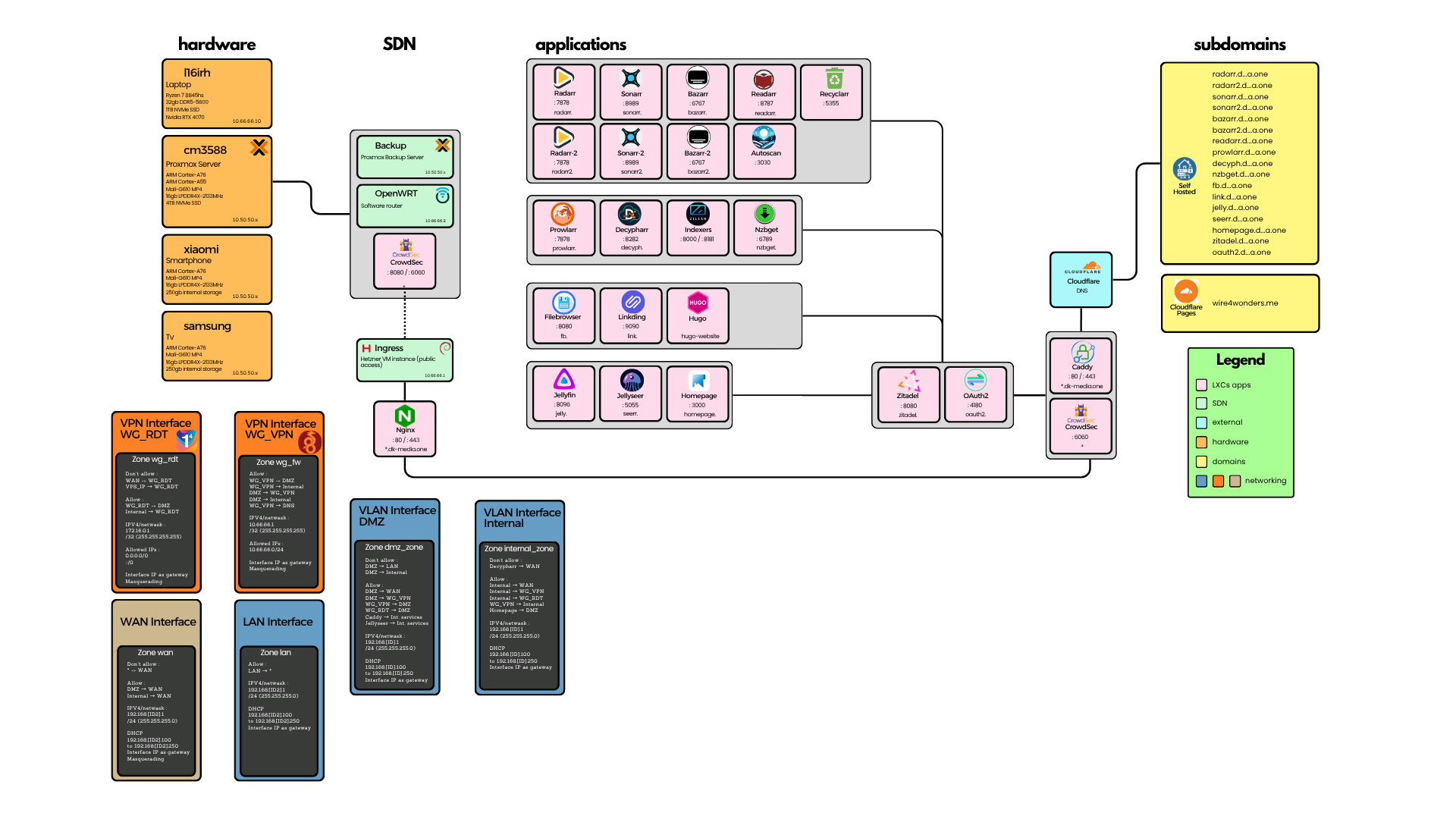
We’ll dive deep into each component individually in upcoming posts, exploring what these nodes are, why they’re essential, and how they work together in beautiful harmony. So stick around for updates !
For now, I’ll paint the big picture explain the scheme broadly so we don’t get lost in the weeds from the start.
Proxmox#
Proxmox VE is an open-source server virtualization management platform built on Debian. It’s specifically optimized for KVM virtual machines and LXC containers
The difference between between these two virtualization approaches lies in the level of virtualization:
- VMs are fully isolated, complete computer systems running their own kernel. They can host and display a variety of services using machine’s hardware.
- LXCs are significantly more lightweight than VMs, as they share the host system’s Kernel. This make them incredibly efficient. Ideal for single-service deployments where you want maximum performance with minimal overhead.
We can enter a specific VM or LXC either via CLI by SSH or via the Web-based management interface.
SDN#
SDN is a relatively new concept, and stands for Software Defined Networking. Instead of being bound by physical switch limitations, SDN creates virtual networks using software to manage connection between machines in a network.
In my particular setup, I went with OpenWRT as my router solution. This isn’t just any router OS—it’s a specially crafted, open-source operating system designed for maximum flexibility and control. OpenWrt handles routing, interface management, and IP address attribution to every machines connected to the network.
As stated, security is paramount in my setup. To keep my homelab safe from internet wanderers and digital troublemakers, I’ve deployed a battle-hardened Hetzner VPS as my ingress gateway for very few bucks each month. Combined with WireGuard VPN tunnels, this creates secure, encrypted pathways for authorized clients and can serve as internet endpoint if needed.
Applications#
This is where the magic happens - my self-hosted application ecosystem.
This list is including but not limited to:
- Reverse proxies: I use Nginx on my Hetzner VPS to reverse proxy my external services to the user ; and Caddy on my Proxmox Server handles internal routing with automatic HTTPS.
- Media Management: Currently, I use the *arr stack to automate my entire media pipeline. Files can come from Torrent or Usenet sources.
- Media Consumption: On my brother’s advice, I use Jellyfin as my streaming app and Jellyseerr as my movie picker. Both are available to the majority of devices and if not, we can use their web interface.
- Bookmark manager: Always wanted to synchronize my bookmarks accross my devices. Linkding helps me with that. It’s a really simple tool that creates a secure, multi-user bookmark database that’s lightning-fast and resource-efficient.
- File manager: Filebrowser shines by its sleek interface and simplicity of usage. Features include shareable download links, comprehensive user management, and built-in file editing capabilities amongst other.
- Network monitoring: CrowdSec acts as a safeguard against malicious individual. It detects threats automatically and reacts accordingly before they become a problem.
External#
To communicate with my NAS from the outside world without having to type hideous IP addresses with weird port numbers (because who has time for that?), we need to dive into the world of DNS resolution.
When a device wants to establish a connection with a server on the Internet, it needs to know the destination IP and its associated port. So when you make a request in your browser — say, google.com — your DNS resolver typically contacts a Recursive DNS Resolver and asks, “Hey, what’s the IP address for this domain?” With that IP in hand, your device can establish a connection to the server.
Every server that holds definitive information about a specific domain name is called an Authoritative DNS server for that domain.
For my system, I’ve chosen Porkbun as my domain registrar—primarily because of their incredibly attractive purchase and renewal prices, plus the countless Reddit recommendations. For DNS hosting, I went with Cloudflare because, well, they’re basically the gold standard for DNS performance and reliability.
My VPS public IP maps to my custom domain ’d…a.one’ via an A-record. This creates a clever traffic routing system: all requests hit my VPS first, which means the real server address stays completely hidden from prying eyes.
Finally, CrowdSec continuously monitors all traffic patterns from both the router and reverse proxy locations for redundancy. When it detects malicious behavior or suspicious activity, the offending IPs get automatically blocked with zero tolerance. No questions asked, no second chances.